 Kadr
Your console keeps playing
Connect its HDMI output to a capture card. Keep using your console controller as usual.
Connect your console through a USB capture card. Play on your computer, make 30 fps footage look smoother at 60 fps, and record your best moments.
USB capture card required; sold separately.
Check your computer and capture card
Connection diagram · animated illustration, not gameplay
Your console runs the game. Kadr turns your Mac or PC into the screen you play on.
Connect its HDMI output to a capture card. Keep using your console controller as usual.
A USB capture card brings video and sound to your computer. An HDMI cable alone is not enough.
Open the live picture, enable frame generation if supported, and start playing.
Before you start: you need a console, an HDMI cable, a USB capture card and a compatible computer.
For a 30 fps source, Kadr generates an extra frame between two original frames. Camera movement looks smoother on your computer.
Motion illustration using a Poly Haven photo (CC0). Not a recording of Kadr or a gameplay benchmark.
Made for taking in the sceneTry it in story-driven games and exploration. Native 60 fps sources pass through without frame generation.
Smoother motion is not faster inputFrame generation adds delay and does not increase the game’s native FPS. For competitive play, leave it off.
One app to view the capture card, adjust the picture and record your game.
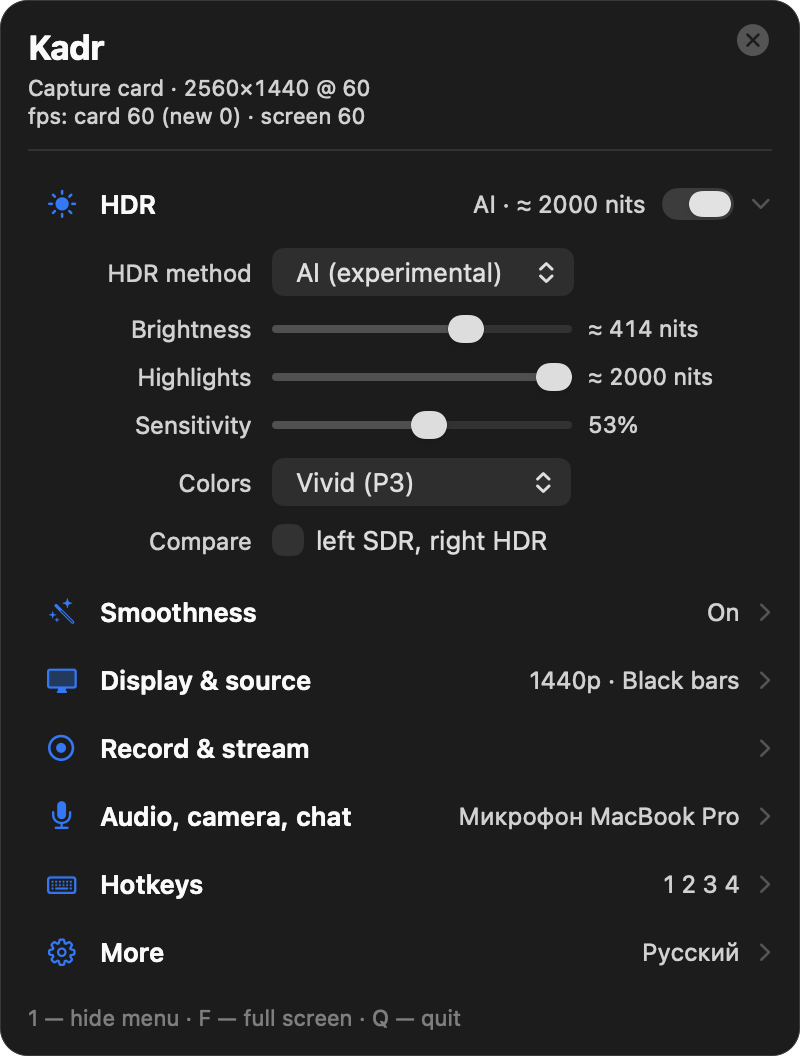
Actual Kadr settings interface
Once the picture is on your screen, the extras are already there.
Illustration of the effect using HDR photo data. HDR+ in Kadr requires an HDR display.
Enhance bright light sources in SDR games on an HDR display. Choose Classic or AI mode.
Record in 1080p or 4K. Stream to Twitch, YouTube or RTMP with webcam, microphone and scenes in the app.
Upscale a 1080p capture with MetalFX on Mac or FSR 1 on Windows. On ultrawide screens, choose ambient glow, smart stretch or fill.
Viewing the capture card and generating frames have different requirements. Check both before downloading.
Capture viewing: a DirectX 11 graphics card.
Frame generation: a DirectX 12 graphics card. Tested on GeForce RTX 5070 Ti.
Capture viewing: macOS Sonoma or later.
Frame generation: Apple Silicon and macOS 26.
A USB capture card is requiredDesigned for UVC capture cards. Tested with ASUS TUF CU4K30. Compatibility and delay depend on your card and computer.
HDR+ needs an HDR displayFor example, a MacBook Pro XDR display or an HDR monitor with Windows HDR enabled. You can use Kadr on an SDR screen without HDR+.
What you need, what to expect, and where the limits are.
Yes, if you do not already have one. It sends HDMI video and audio from the console to your computer over USB. Kadr is the software; hardware is not included.
No. The console still runs the game at its original frame rate. Kadr generates intermediate frames for the picture shown on your computer. Input responsiveness is not the same as native 60 fps.
The original Kadr measurements report about 41 ms without frame generation and 77 ms with it, from capture card to screen on Mac at 1440p with ASUS TUF CU4K30. This is not the full controller-to-screen latency and is not a guarantee for every setup.
The beta includes all features free through November 30, 2026. The current plan after beta is a free version and a one-time Pro upgrade; the final price is not listed yet.
On Windows, unzip the download and launch Kadr.exe. On Mac, open the DMG and drag Kadr to Applications. The beta is not yet code-signed on Windows or notarized on Mac, so the system may show an installation warning. Mac needs camera and microphone permissions to receive capture-card video and audio. On PS5, HDCP must be disabled for gameplay capture.
No account is needed. According to the Kadr privacy policy, the app has no analytics or telemetry and processes the picture locally.
Download Kadr, connect your capture card and try your favourite game on your Mac or PC.
Windows 10 / 11
ZIP archive · version 1.0.1 beta
macOS 14+
DMG installer · version 1.0.1 beta
Free beta through November 30, 2026 · No account needed.
Frame generation has additional requirements. Check compatibility